

Connect Clearcue to Slack
Clearcue combines social signals from your brand, team, competitors, influencers, topics, events, news, job offers and more to show real-time intent and find similar leads you’d never spot manually. Connect your Slack workspace so you and your team receive daily notifications when new leads are detected and qualified by Clearcue.What you’ll get
- Daily lead updates - Receive a summary of all new leads from your selected List
- Lead details included - Each notification includes key information about the detected leads
- Team-wide visibility - Share lead notifications with your entire team in a dedicated channel
- Scheduled delivery - Choose the time that works best for your workflow
Add to Slack
Click the button below to connect Clearcue to your Slack workspace:
Configure your notifications
After installing the Slack app, configure your notifications in Clearcue. You can set up notifications in two ways:From Settings
Go to Settings → Integrations → Slack to manage all your Slack notifications in one place.1
Select a channel
Choose the Slack channel where you want to receive lead notifications. This can be a public or private channel.
2
Select a List
Pick which List you want to monitor. New leads added to this List will be included in your daily notification.
3
Set your notification time
Choose what time you want to receive your daily lead update.
From a List
You can also configure Slack notifications directly from any List:1
Open the List you want to monitor
Navigate to the List you want to receive notifications for.
2
Go to List Settings
Go to List Settings → Integrations → Notifications.
3
Configure your Slack notification
Select a Slack channel and set your preferred delivery time.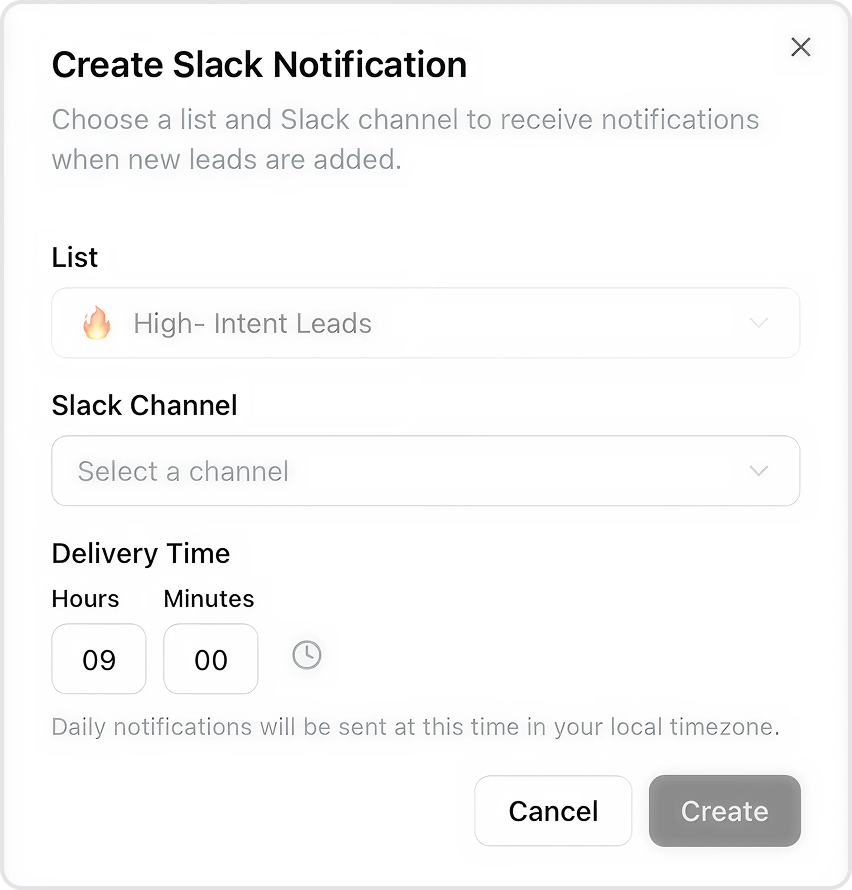
How it works
- Clearcue continuously monitors data sources and detects new leads
- Leads matching your Audience filters are added to your Lists
- Once daily, at your chosen time, Clearcue sends a summary of new leads to your Slack channel
- Your team can review leads together and take action quickly